


Figwee Visual Food Diary
3.225.00 Reviews
App Specs
- Version
- 4.7
- Updated On
- License
- Free
- Downloads
- 10,000+
- Developer
- Bellwether Ideas LLC
- Categories
- Food & Drink
- Platform
- Android
Screenshots
 Analysis by AppCompare
When I choose a calorie-counting app, I care less about how many charts it can display and more about whether I can record an ordinary meal without turning lunch into homework. That is the decision point with Figwee: its visual approach is meant to help you think about portions, while the broader diary format keeps food tracking in view. If you want a quick way to make your eating patterns more noticeable, that combination is appealing; if you expect every entry to be effortless or perfectly precise, it is worth weighing the trade-offs first.
Figwee is a free Food & Drink app from Bellwether Ideas LLC, with optional in-app purchases priced from $3.99 to $7.99 per item. It is rated for Everyone, and its average rating is 3.2 from 69 ratings, with 21 written reviews. More than 10,000 people have installed it. Those figures suggest a modest, mixed reception rather than a runaway favorite, so I would approach it as a potentially useful tool to test against your own routine, not as a guaranteed fit. It was released on April 2, 2019; version 4.7 requires Android 6.0 or later.
Choose it for the way you judge portions
The central question is whether seeing food portions helps you more than typing a number or selecting an item from a list. Figwee Visual Food Diary is built around visual portion references, which can make a familiar meal easier to estimate when you do not have a kitchen scale nearby. I find that especially relevant for meals assembled by eye: a bowl of cereal, a serving of pasta, or leftovers packed into a lunch container. A visual comparison will not turn an estimate into a laboratory measurement, but it can give you a steadier starting point than guessing from memory alone.
That makes the app most promising for someone who wants to build awareness, spot recurring habits, or get more consistent about estimating servings. It is less compelling if your main goal is to enter packaged foods by barcode, automate logging, or follow a tightly prescribed nutrition plan. Before settling in, check whether the way you usually eat—home-cooked dishes, restaurant meals, snacks, or a mix—works comfortably with the app’s food-entry approach. The best diary is the one you will actually keep using after a busy week begins.
Where the visual diary helps—and where it asks more of you
I find the main decision with a visual diary is whether seeing portions makes food tracking clearer for you, or simply adds another step. Figwee may suit someone who wants a steadier way to estimate familiar meals, while a text-first tracker can feel quicker when you already know exactly what to enter. The distinction matters most in everyday use: next, I’ll look at where the visual approach earns its place and where it asks for patience.
Visual Portion Control
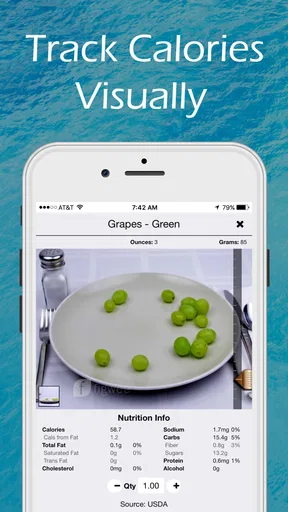
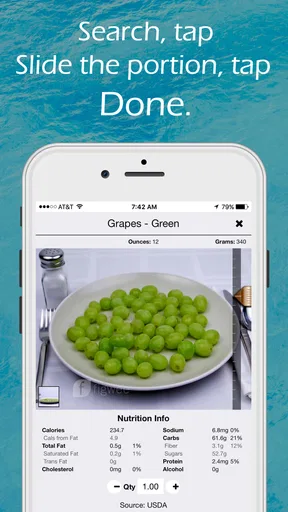
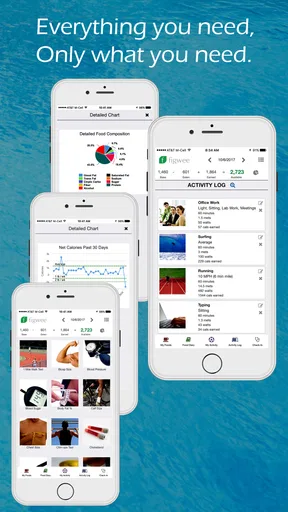
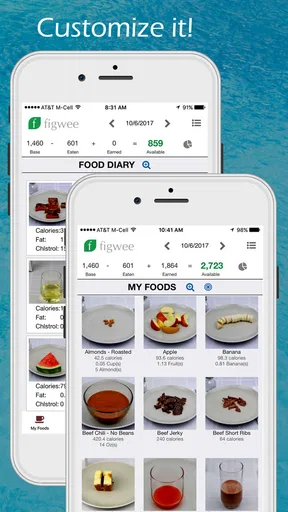
One of the standout features is its visual portion tracking. Instead of just inputting numbers or searching through endless lists of food types, you can actually see images of different portion sizes. This is a game-changer for visual learners like myself, who need to see what a "medium" apple or a "small" serving of pasta looks like. The images help you understand portion sizes without having to weigh everything out, which is a huge time-saver.
The less obvious benefit is that a picture-based estimate can help you notice your own repeatable habits. For instance, if you regularly serve yourself pasta in the same bowl, using the same visual reference each time may matter more than trying to estimate an exact weight from scratch. That is useful for comparing one day with another, even if the absolute number is only an approximation. My practical tip is to use the visual guide consistently for foods you eat often, and to be cautious when a meal contains several ingredients or a dense sauce that changes the portion’s nutritional value.
Worth Reading Before You Choose

Flipboard Shows What News Apps Must Do Beyond the Feed

Switching to Android Auto Means Rethinking Your Driving Routine

Google Calendar Makes a Crowded Week Easier to Manage

Ludo King Makes the Most of the Minutes Between Plans

Baby Panda World Brings Quick Play to Modern Phones, but Its Game Library Feels Busy

ESPN’s Live Game View Makes Following Close Games Easier
There is a trade-off, though: visual cues are only as useful as the match between the reference and what is on your plate. A restaurant serving can be piled high, a homemade recipe may include extra oil, and a mixed dish can hide ingredients that are difficult to estimate by appearance. In those cases, the visual method gives context, not certainty. If you need close tracking for a medical or highly specific nutrition reason, I would not treat a picture-based serving estimate as a substitute for professional guidance or more exact measurement.
Detailed Nutritional Information
Beyond just portion control, the app provides detailed nutritional information for pretty much any food you can think of. Whether you’re trying to track carbs, fats, or protein, Figwee has got you covered. I found this particularly useful when trying to balance my meals throughout the day. Plus, it also gives insights into your daily caloric intake and expenditure, which helps if you're trying to lose, gain, or maintain weight.
For day-to-day use, I would treat the nutrition view as a way to ask better questions rather than as a scorecard. If you notice that lunch is usually light on protein, for example, you can make a deliberate choice at dinner; if snacks add up, the diary can make that pattern easier to see. A useful workflow is to record meals close to when you eat them, then review the day once rather than repeatedly checking totals. That keeps the app in a supporting role instead of letting calorie figures dictate every decision.
As with any food log, the information is only as dependable as the entry you choose and the portion you estimate. Similar dishes can differ in ingredients, preparation, and serving size, so a generic match may not describe your meal exactly. I would be particularly careful with restaurant food and shared dishes, where it is hard to know how much oil, dressing, or each ingredient went into a serving. Figwee can support awareness, but it cannot remove that uncertainty.
A realistic routine, not another daily chore
Imagine packing lunch before work: you put leftover pasta into a container, add fruit, and eat between meetings. With a visual diary, you can make a reasonable portion estimate while the meal is still fresh in your mind, rather than trying to reconstruct it at night. Later, reviewing the day can reveal whether the afternoon snack was a one-off or part of a pattern. That kind of small, repeatable use is where a food diary can earn its place.
To make that routine easier, start with only the meals you most want to understand. Logging every condiment and bite from the first day can make tracking feel burdensome, and a diary abandoned after a few days offers little insight. I would first use it for a week of ordinary meals, noting recurring breakfasts or lunches and focusing on portion estimates you can repeat. If you find that entry takes too long or the visual comparisons do not fit your foods, that is useful evidence to switch approaches rather than a reason to blame yourself for not keeping up.
Another practical trade-off is that a diary can change how you think about eating. Some people find a record calming and informative; others become preoccupied with totals. If tracking makes meals stressful, pause or choose a less number-focused way to monitor habits. The app is a tool for reflection, not a measure of personal success, and it is not necessary to log every meal to learn something useful.
Planning ahead and checking what carries over
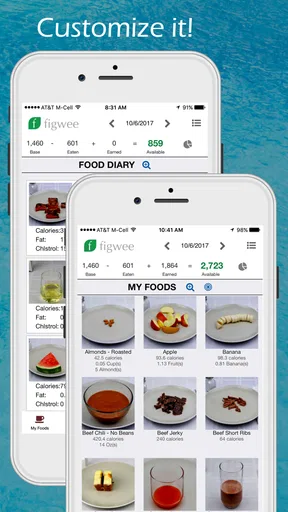
Figwee also allows you to create and customize meal plans. This is awesome for those of us who like to plan meals in advance. You can set up your meals for the week and just follow along, which takes a lot of the guesswork out of daily meal prep. Plus, it syncs across devices, so you can check your plan from your phone or tablet anytime.
Planning is most helpful when you use it to reduce decisions, not to lock yourself into a menu that no longer suits the day. I would sketch out a few likely meals, then leave room to replace one when plans change. For instance, a planned dinner can still be a useful reference even if you end up eating something else; the important thing is to adjust the record to what you actually ate rather than letting the plan stand in for the diary.
If you are considering using more than one device, syncing can make a plan easier to consult, but I would check that your entries appear as expected before relying on a second device as the only copy of your routine. A simple test—make a small change, then confirm it is visible where you need it—can prevent confusion. Also consider whether you want a meal planner at all: people who decide what to eat spontaneously may get more value from logging meals after the fact than from preparing a week-long schedule.
Support, expectations, and the learning curve
Another aspect I really appreciated is the community support within the app. There’s a section where you can connect with other users, share tips, and get advice. It feels like having a little support group in your pocket. The app also has a robust FAQ and support section, so if you ever get stuck, help is just a tap away.
For a new user, the useful question is not simply whether support exists, but whether the app’s way of organizing food feels clear after a few real entries. Try a meal you know well before building a detailed plan around the diary. That lets you judge the portion references and nutritional view with a familiar example, and it gives you a fair sense of how much attention logging will require. If you cannot find a suitable match or the process feels awkward, do not assume that more effort will fix the mismatch.
Community advice can be encouraging, but I would keep personal nutrition decisions grounded in your own needs and, where appropriate, advice from a qualified professional. Other users’ routines may not suit your circumstances. Likewise, a help section can answer practical questions about using the app, but it is not a replacement for individual health guidance.
When another kind of tracker is the better fit
Compared with a conventional calorie counter centered on text search and rapid entry, Figwee’s clearest distinction is the emphasis on seeing portions. That can be a better starting point if serving size is what you routinely misjudge. A database-first tracker may suit you better if you prefer typing food names, scanning packaged products, or building detailed records from exact quantities. A paper journal or a simple notes app may be better still if your aim is to notice broad patterns without seeing a running calorie total.
There is also a difference between tracking and coaching. Figwee’s diary and meal-planning tools can help organize what you eat, but I would not choose it on the assumption that an app will make decisions for you or provide personalized clinical direction. If you need structured support for a health condition, a dietitian or a tool designed around your care plan may be more appropriate. If you mainly want a visual aid for ordinary portions, the app’s approach has a clearer reason to be on your phone.
Switching from another tracker has a small but real cost: you may have to establish your usual foods and routines again rather than expecting a new diary to feel familiar immediately. Before moving your whole process, try Figwee alongside your current method for a few meals. Compare not just the numbers, but how quickly you can record a meal and whether the resulting view helps you make a practical choice. If the visual reference improves your estimates, keep going; if you spend more time searching or correcting entries, the familiar alternative may serve you better.
Final Thoughts
Overall, I’m really impressed with Figwee Visual Food Diary. It’s not just another calorie counter; it’s a comprehensive tool that combines visual learning with detailed nutritional tracking. Whether you're new to food diaries or a seasoned pro, this app has something to offer. It's designed to make your life easier, and it definitely does just that.
If you’re looking to take control of your eating habits and want an app that’s both functional and easy on the eyes, give Figwee a try. It might just be the missing piece in your health journey!
My recommendation is to try it with a few meals you eat regularly, especially if estimating portions is the part of tracking that usually trips you up. The free download keeps that first test accessible, while the optional purchases mean it is sensible to check what you actually need before spending anything. Its 3.2 average is a reminder to judge the experience for yourself rather than expecting universal approval. If the visual approach makes logging clearer and more consistent, it may be a useful fit; if you want automatic entry, exact measurement, or a less calorie-centered habit tool, I would choose another approach.
Pros
- Easy-to-use interface for quick food logging.
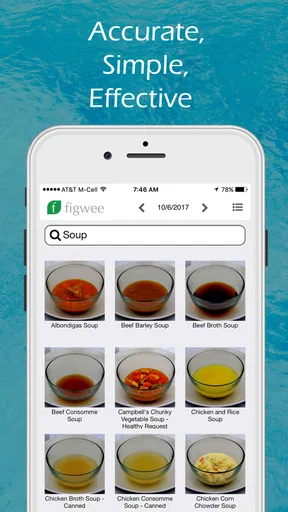
- Comprehensive food image library enhances tracking.
- Customizable meal entries for personalized tracking.
- Tracks calories with visual portion sizes.
- Supports weight management with detailed insights.
Cons
- Limited food database for international cuisine.
- Requires internet for full database access.
- No barcode scanner for quick item entry.
- Subscription needed for premium features.
- Lacks integration with fitness trackers.
FAQs for Figwee Visual Food Diary
What is Figwee Visual Food Diary and how does it work?
Figwee Visual Food Diary is an innovative app designed to help users track their food intake through visual representations. Instead of traditional calorie counting, users select images that best represent their portion sizes. This visual approach makes it easier to estimate calorie intake and manage diet plans effectively, offering a more intuitive way to understand and control eating habits.
Is Figwee Visual Food Diary compatible with both Android and iOS devices?
Yes, Figwee Visual Food Diary is available for both Android and iOS platforms. Users can download the app from Google Play Store or Apple App Store, ensuring compatibility with a wide range of smartphones and tablets. The app is designed to work seamlessly across different devices, providing a consistent user experience.
Does Figwee Visual Food Diary require an internet connection to function?
While Figwee Visual Food Diary can be used offline to record food entries, an internet connection is required to access certain features like syncing data across devices, accessing the full image database, and receiving updates. For an optimal experience, it's recommended to use the app with a stable internet connection.
Are there any subscription fees or in-app purchases in Figwee Visual Food Diary?
Figwee Visual Food Diary offers both free and premium features. While the basic version includes essential functionalities, users can opt for a subscription to unlock additional features such as expanded food databases, personalized dietary recommendations, and advanced tracking options. These subscriptions typically involve a monthly or annual fee.
How does Figwee Visual Food Diary ensure the accuracy of its food database?
Figwee Visual Food Diary collaborates with nutrition experts to maintain a comprehensive and accurate food database. The app frequently updates its data to reflect the latest nutritional information. Additionally, users can contribute by suggesting corrections, which are reviewed by the Figwee team to ensure accuracy and reliability.


